How to Get More Vet Clinic Reviews Without Making It Feel Like a Transaction


When a pet parent searches for a vet nearby, they’re looking at a map with three or four clinics on it, and the thing separating them is a star rating and a handful of recent reviews. That’s often the whole decision.
So reviews are worth going after. The question is how to ask without the request feeling like one more thing handed to the client on their way out the door.
The answer is usually about timing and sequence, not about the ask itself. And it’s something you can build into your team’s routine so it happens after every appointment, not just when someone remembers.
Post-Visit Follow-Up: Ask About the Pet Before You Ask for a Review
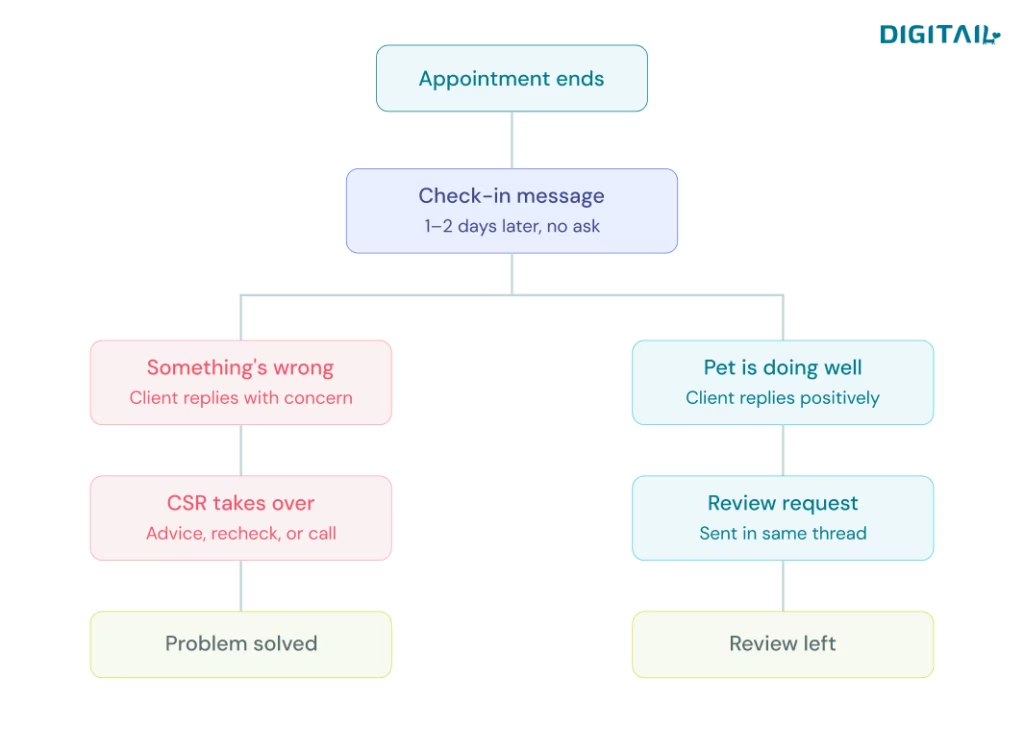
A day or two after the appointment, send the client a short message asking how their pet is doing.
Hi Sarah, just checking in on Bailey. How’s she doing after Tuesday’s visit? Is she eating normally again?
No link, no ask. Just a check-in from the clinic that treated her.
From there, the conversation goes one of two ways, and both are useful to you.
If something’s wrong, you hear about it now, while you can still do something. Bailey’s still off her food, the incision looks red, the client has a question about the medication. Someone from your team picks up the thread and helps. That’s a problem solved instead of a bad review three days later.
If everything’s fine, the client tells you Bailey’s back to normal and usually thanks you. That’s the moment to ask:
So glad to hear it. If you have a minute, a quick review really helps other pet parents find us.
The ask lands differently here. You checked in on their pet first, the outcome was good, and the request comes at the end of a real conversation rather than next to an invoice.
Building a Review Request Workflow Your Team Follows Every Time
Any clinic can send a thoughtful follow-up once. The clinics that see this show up in their review count are the ones where it happens every time, in the same way, without depending on who’s working that day.
That means deciding a few things and writing them down:
- Who sends it. Usually your CSR or receptionist — whoever already owns client communication day to day.
- When it goes out. A day or two after the appointment works well.
- What it says. A short template keeps the tone consistent across your team.
- Which appointment types are included. Not all of them.
- Who watches the replies. The whole thing depends on someone being there when a client writes back.
Skip this, and follow-ups happen on quiet mornings and get dropped on busy ones, which over a few months is roughly the same as not doing them at all.
Manual vs. Automated Review Requests: Which Fits Your Clinic
Manually, your CSR works through yesterday’s appointments each morning, sends the check-ins, and handles whatever comes back. For a smaller clinic this is very manageable and about as personal as it gets.
Automatically, the check-in goes out on its own the day after the visit. Your team member only steps in when a reply needs a person. If the client says something’s wrong, the CSR takes over the conversation from there. If the client says everything’s great, the workflow sends the review request.
Automating it removes the failure point, which is always the same one: remembering to do it on a day when three emergencies came through the door. Your CSR still handles every conversation that actually needs them — they’re just not spending the first hour of the day typing opening messages.
If you’re using AI to write and send those check-ins, put real effort into the tone before you switch it on. Short, warm, uses the pet’s name, sounds like your clinic. Clients can tell the difference between a message written for them and a message sent to everyone, and if it reads as automated, the whole approach stops working.
Which Veterinary Appointment Types Should Trigger a Review Request
Set the rules by visit type:
| Visit type | Send check-in? | Review ask |
| Wellness exam, vaccines, routine dental | Yes, 1–2 days after | Yes, if reply is positive |
| Surgery, complex cases | Yes, 1–2 days after | Hold until recovery is confirmed |
| Emergency visits | Case by case, from a person | Only if the case resolved well |
| Euthanasia | No | Never |
| Complaint or billing dispute | Resolve first | Not until resolved |
This is the part worth being careful with. A review request that lands on a client who just lost their pet costs you far more than the review would have been worth.
How to Run Post-Visit Follow-Ups in Digitail
The follow-up conversation happens through two-way chat in the Pet Parent App. Your team sends the message, the client replies, and the whole thread sits next to the patient record. Ask for a photo of a healing incision, answer a medication question, send the review link — same conversation, no switching tools.
The app also covers the stretch between visits. Clients can see their visit summary, discharge instructions, diagnoses and invoices, book their next appointment, and log notes on how their pet is doing at home that come back to your team in the patient timeline. Clients who don’t feel dropped after checkout are the ones who leave warm reviews.
Using AI to Automate Veterinary Client Follow-Ups
Tails Concierge, Digitail’s AI assistant for front-desk work, handles follow-ups and proactive check-ins as part of its standard workflows, alongside triage, intake, appointment booking, and discharge notes. The follow-ups run without tying up staff time, and the proactive check-ins are built to give pet parents guidance at home, so care continues between visits.
Practically, that means the day-after message goes out on its own, and your CSR’s job changes from sending messages to reading replies. When a client writes back that something’s wrong, your team member steps into a conversation that’s already open, with the patient record right there. When the reply is positive, the workflow moves on to the review request.
Two things worth knowing before you turn it on:
- It works inside your existing workflows rather than replacing them, assisting in the background instead of forcing you to change how you practice. You’re still deciding the timing, the appointment types, and the tone.
- Your clinic stays in control. Permissions, audit logs and review steps are built in, and outputs can be reviewed, edited or rejected by your team. For client-facing messages that matters — you want to read what’s going out under your clinic’s name, at least for the first few weeks.
Spend time on the tone during setup. This is the message that decides whether the whole approach reads as care or as marketing.
How to Automate Veterinary Review Requests with Digitail Integrations
For the review request itself, Digitail supports two integrations:
ReviewTrackers triggers a campaign once the Record/SOAP is closed. By default, it won’t send more than once a month per client, and a client who comes in with two pets gets one email, not two.
ReviewTree uses the same trigger and lets you configure when the survey goes out and which appointment types it applies to. It caps at one request per client per 30 days, and waits six months if they’ve already responded.
Both are third-party services with their own subscriptions, set up from the Integrations page in Digitail.
The appointment-type filtering in ReviewTree is the setting to spend time on. That’s what lets you exclude euthanasia and surgery from the flow and then leave it running without checking it every week.
Curious how other practices are doing this? Shoreview Veterinary hit 60+ five-star Google reviews in their first six months, and Dr. Skinner breaks down what got them there.
How to Measure Veterinary Review Performance
Track reviews per month rather than your total. A steady trickle of recent ones tells a prospective client you’re an active practice; forty reviews from two years ago tells them you ran a campaign once.
And don’t chase a perfect 5.0. People read a flawless rating as suspicious. A 4.7 with a few considered replies to the occasional three-star looks like a real clinic run by real people, which is exactly what someone picking a vet is trying to find.
Create a Better Experience Before, During and After Every Visit
See how Digitail helps veterinary teams simplify client communication, automate routine workflows, and deliver more connected care.