

Know who’s handling every client conversation
When a client message lands in a shared inbox, everyone assumes someone else is handling it.
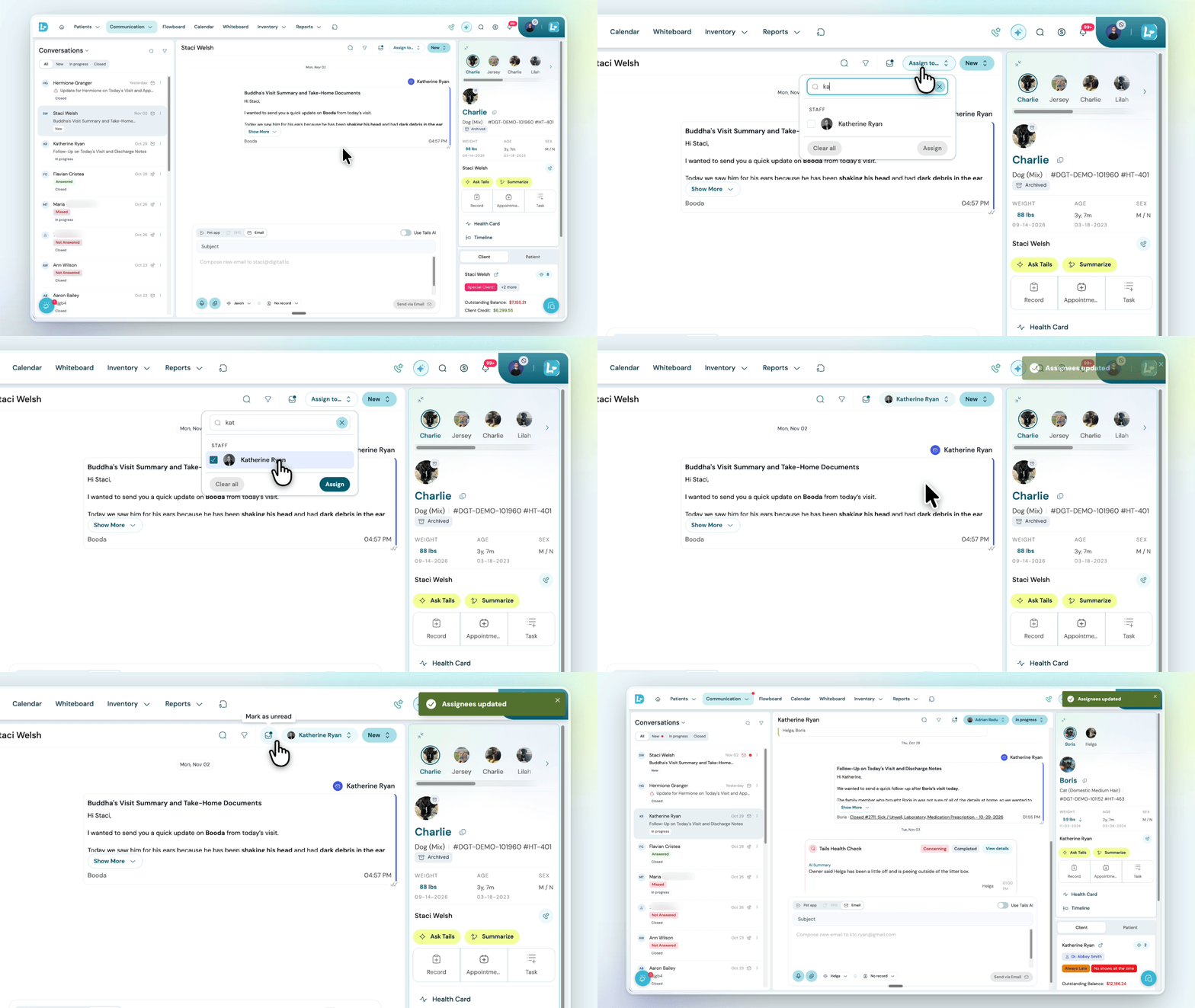
Front desk teams can now assign any conversation in the Inbox to one or more people, a whole team, or a mix of both. Whoever’s assigned is notified straight away, and again when the client writes back.
The new assignee filter lets each person see what’s theirs, what belongs to their team, or what nobody has picked up yet, and it remembers that choice next time they open the Inbox.
Status and read or unread can be changed from a quick menu on each row, without opening the conversation.
Calls get the same clarity. When a call is logged, your team can now note exactly who they spoke with, whether that’s the client or another contact linked to the pet.
Read more in the help article →
Generate only your part of the SOAP with role profiles
A SOAP note is rarely one person’s job, and the scribe now reflects that.
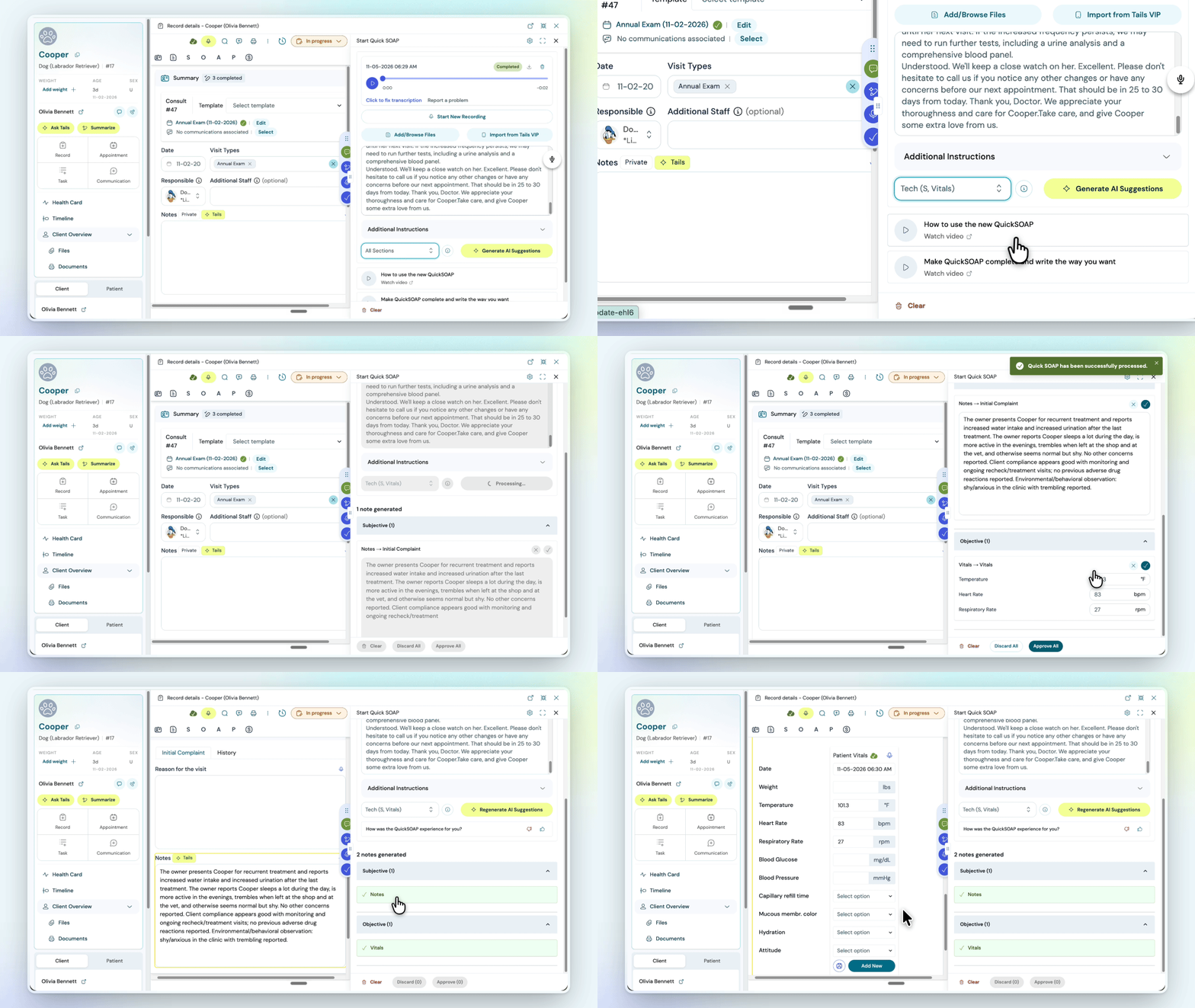
Role profiles are back in Digitail’s Built-in Scribe. Each person picks Vet, Tech, or a profile of their own, and the scribe generates only the sections they’re responsible for. A vet tech can generate Subjective and vitals at intake, then the vet generates the rest after the exam.
Dropdowns, checkboxes, vitals and visit types fill in with real values rather than text paragraphs like some other scribes on the market.
Bloodwork, X-rays and PDFs can also be added alongside the recording, and the record stays open to work in while dictating.
Visit the help article to find out more →
Unsent client communications are saved as drafts
Front desks get interrupted mid-message all the time, by a phone call, a client at the counter, or a vet with a question.
If the compose window gets closed by accident before anyone hits send, the email or text is now saved as a draft. The next time that team member starts a message to the same client, they can pick up where they left off or delete the draft and start fresh.
Drafts are private to the person who wrote them, and they’re still there after a page refresh, in a new tab, or on another device. Once the message is sent, the draft clears automatically.
Early Access
New clients register themselves while they wait
Typing every new client and pet into the system at check-in holds up the front desk at the busiest times of day.
With In-Clinic Registration, new Pet Parents enter their own details and their pets’ on a clinic tablet. Everything goes straight into Digitail, with no approval step. Each clinic chooses which fields to collect and can attach consent forms to sign on the spot.
Staff see who’s registered today on the Arrivals page, along with a live waiting time, and existing clients are directed to the front desk as usual.
Front desks get shorter lines during busy hours, and new client records start out complete.
In-Clinic Registration is available in early access now and comes to every Digitail clinic on November 16, 2026.
Learn more about in-clinic registration →
Improved task creation and new automations
Follow-ups that rely on someone remembering are the easiest to lose. When a lab order is completed, a task can now go straight to the ordering vet, and a visit type like Prescription Refill can set off the steps that follow it, assigned to the right person or team.
The task form has also been redesigned, with status up front and required fields clearly marked. Tasks sync with Google Calendar, and marking a blocking task done can reopen that time for bookings.
This update is currently in early access. Already using Digitail? Message our team in the app and we’ll switch it on for your clinic.
Learn more about Task automation →
Want to see Digitail in action? Book a demo →