

Print patient labels, enroll pet parents in wellness plans from your website, and more
May was about reducing the manual tasks that stack up before and after every appointment. Patient labels that print from wherever your team already is inside Digitail, wellness plan sign-ups that don’t need a follow-up call, and a faster Digitail for everyone in the clinic. Here’s everything that went live this month.
A Faster, More Intuitive Digitail
Hunting through menus to find the right section or page costs time your team does not have. Starting the week of June 8, a new Digitail experience is becoming available to all clinics.
A new search bar inside any sub-menu lets you find any section directly, without scrolling through a long list of options.
Your clinic logo is now visible alongside a customizable accent color, so every team member always knows which clinic they’re working in.
Dictation and Tails conversations now stay active as you move between pages. A session started mid-workflow does not reset when you change screens.
New Patient Labels
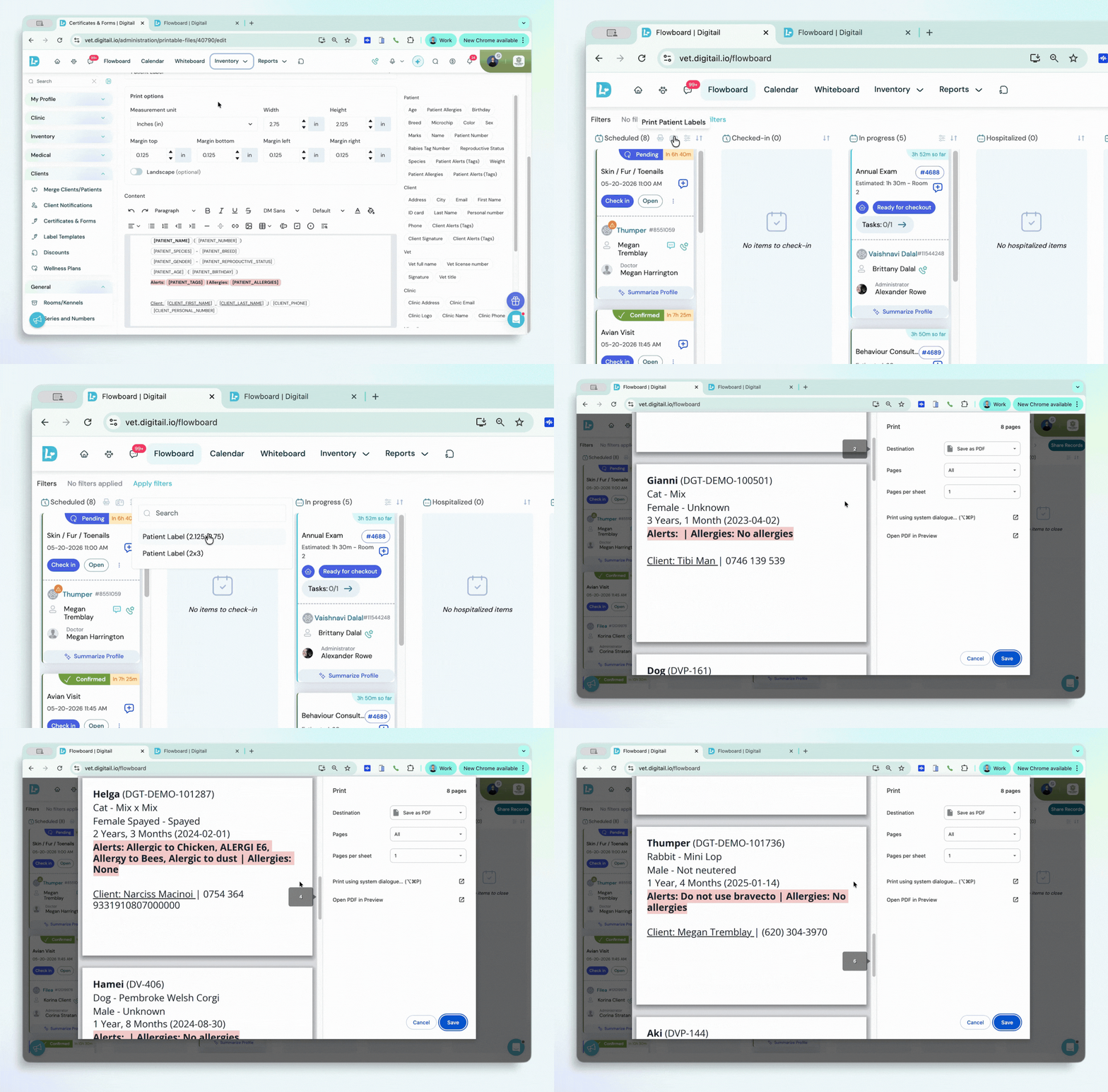
Cage slips generated outside your practice management software add one more screen swap to an already busy admit. Patient Labels is now live in Digitail.
Print directly from the Health Card, Appointment Card, or Flowboard. From the Flowboard Scheduled column, you can bulk print the full day’s inpatients in a single action.
Admins configure label templates once, with two default sizes included to cover the most common label stock.
Your front desk handles labels from the same screen they’re already on, without breaking the flow.
Visit the help article to find out more →
Wellness Plan Enrollment From Your Clinic’s Website
Wellness plan adoption stalls when enrollment asks too much of the client. Pet parents can now complete sign-up via a secure link sent directly in the proposal email, with no app download needed.
A shareable enrollment link can also be added to your clinic website or social media profile, so new clients can register before their first visit. The link is per-plan. Setup is one-time, and the clinic receives a notification each time someone enrolls.
Better adoption numbers without any follow-up calls.
Visit the help article to learn more →
Other improvements:
Digitail Secure Payments transactions now filter separately in the Payments Report
Reconciling card payments used to mean sorting through a combined transaction list. New chart toggles in the Payments Report let you filter Digitail Secure Payments transactions separately from manual payments, giving you a cleaner view of each payment method.
Change a report date once and both views update together
Adjusting the date range in a report previously meant updating two separate areas. The date filter now syncs the summary panel and the data table at the same time, so they always reflect the same period, saving you extra steps in your day.
All tax rates are now managed in one place
Tax rates were spread across multiple settings areas. They now live in a single location: Clinic Profile > Company Fiscal Info. Any rate you need to review or update is in the same spot.