Keep your team focused on pets, not inventory
The new Digitail + CDMV integration lets Canadian clinics tie their PIMS directly to their main distributor—automating inventory updates, purchase orders, and cost tracking. No more double entry, stock surprises, or manual price updates.

Run a smoother practice with Digitail + CDMV

Eliminate double entry
Place purchase orders right from Digitail—no tab-hopping or re-typing. From treatment plan to invoice to fulfillment, everything flows in one platform. Fewer clicks and fewer errors mean less frustration for your staff — and more energy to give back to patients and clients. Less stress, more care.

Prevent stock-out surprises
CDMV product pricing syncs in real time within Digitail, keeping invoices correct and margins protected. Clinics gain peace of mind knowing they’re charging accurately, not losing revenue, and making financial decisions with confidence. Every dollar accounted for, every decision clearer.
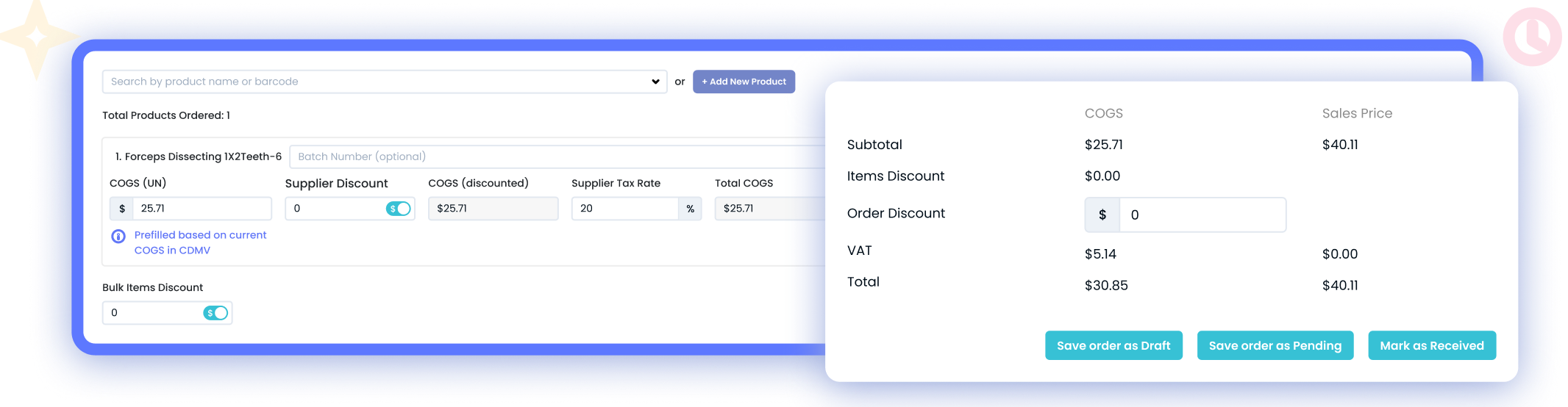
Always-accurate costs & visibility
Live CDMV sync keeps costs current and quantities aligned, so invoices match reality and reports show where cash is tied up
Don’t have a CDMV account yet?
Getting started is easy — set up your CDMV account to unlock direct ordering, live pricing, and full integration with Digitail.
How it Works

1. Set up the integration
Connect your CDMV account in Digitail with your account number and postal code.

2. Sync your products
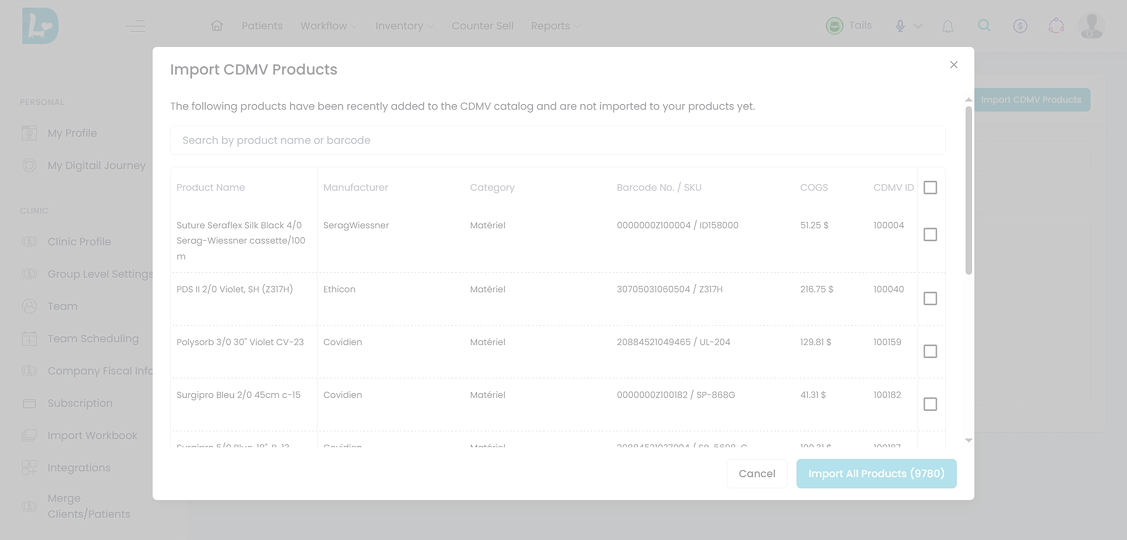
Link existing items or bulk import from CDMV’s catalog to keep pricing and availability always up to date.

3. Order directly
Create purchase orders in Digitail and send them straight to CDMV with costs pre-filled.
See the integration in action
Our all-in-one PIMS now connects directly with Canada’s leading distributor. Download the one-pager to see how the Digitail + CDMV integration streamlines inventory and helps your team focus on patient care.
See Digitail + CDMV in Action
Frequently Asked Questions
How do I set up the CDMV integration in Digitail?
You can connect your CDMV account, import or link products, and place orders directly through Digitail.
What if a product exists in both Digitail and CDMV but isn’t linked?
You can manually link it at any time using the Link Product button in the Unlinked Products tab.
What happens if I import a product from CDMV that already exists in Digitail?
If a matching CDMV product is detected (name or barcode), it is excluded from import to prevent duplicates. You can manually link it later.
How do I place orders with CDMV through Digitail?
Go to Inventory → Shopping List, add your items and quantities, and click Send Order to CDMV. The purchase order will be created in Digitail automatically, pre-filled with CDMV pricing. You’ll finalize the checkout in the CDMV portal, then mark the order as received in Digitail once products arrive.
Note: Only products linked with a CDMV code can be ordered this way.
What if I place orders directly in the CDMV portal?
Orders created directly in the CDMV portal do not sync back. You’ll need to manually create the order in Digitail.
How does cost tracking work?
With the integration enabled, Digitail displays a Current CDMV COGS column in your Products Report. This cost automatically pre-fills in new purchase orders, ensuring invoices and reports match reality.
Is tax included in COGS updates?
No. CDMV COGS values shown in Digitail do not include tax.
Who can use the Digitail + CDMV integration?
Canadian clinics with an active CDMV account and a Digitail subscription.
Who should I contact for help?
Contact Digitail Support for setup and linking guidance; contact your CDMV rep for account-specific questions.
What if I need more detailed setup steps?
For a full step-by-step guide (with screenshots), please reference our Help Center article here:
See why we’re rated #1 in veterinary practice management software



“Now we can get a real-time snapshot of what’s going on with our business, quickly identify trends, gauge efficiency, and make data-driven decisions. Tasks that previously consumed two weeks now require just five minutes.”

“Your support team was excellent. Helped me resolve my issue quickly! I find that the client service is amazing!”

“One of the challenges was choosing a software program that we can use on any device either at the clinic or at home. Being a mom, it was important to me to spend as much time as I could at home while still having access to my business.”

“The software is so easy to use and very functional. One of the great things about it is being able to access it ANYWHERE. The pet parent app is also genius, and our clients are definitely fans! The chat function and diary updates are great for managing difficult cases.”

“We’ve been using Digitail for about 18 months now, and it’s been a successful, smooth transition. There are several neat features that our staff have been enjoying, mainly because they align with the modern workflow and communication preferences of both our team and clients.”

“Digitail helps me get home on time nearly everyday. There is a better way to practice medicine.
This software has literally changed my life! I can’t express my gratitude enough for Digitail.”

“Digitail is constantly stepping up to the plate, innovating, growing, and improving. I wanted software that had the vet in mind – that wasn’t worried about large corporate agendas. I couldn’t be happier with my choice. I know there will always be innovation and growth shaped by their users, like me.”

“Digitail helped us to become more efficient and grow. Vet Concierge’s initial target was around 200 patients. Now with Digitail I can likely manage as many as 400.”

“With Digitail, I can plan ahead to know exactly which days I will need a relief veterinarian.”

“We explored various PIMS options, but Digitail stood out for its innovation. It continually introduces new features and enhancements, and as an independent provider, it offers agility and focus on user experience. Choosing Digitail was a strategic move that will facilitate our progress for many years to come.”

“First time in my career that I can say that I really love our PMS! How many vets get to say that? Huge shout out to the whole team at Digitail….Awesome platform, awesome support!”

“It’s been great! As a small private practice, it has suited our needs wonderfully and we have been able to leverage a lot of their tools to reduce many communication friction points.” Christopher Simmons Owner at Simmons Veterinary Clinic Decatur, GA Very positive experience. They have a great customer service and get things worked out quickly and efficiently.”