

6 Ways to Improve Patient Flow and Team Coordination


A digital whiteboard gives your veterinary team a shared view of patient care, but having that information available doesn’t automatically mean everyone is using it effectively.
A patient may already be in an exam room while their status still shows as checked in. A technician may finish a treatment without marking the task complete. Someone may be waiting for lab results, but nobody is clearly responsible for following up.
These small gaps can create unnecessary delays, duplicate work, and confusion during busy shifts.
The goal isn’t simply to keep your veterinary whiteboard updated. It’s to make sure the information helps your team decide what needs attention, who should handle it, and what happens next.
Here are six practical ways to get more value from your digital whiteboard.
1. Keep Patient Statuses Accurate Throughout the Visit
Patient flow becomes harder to manage when the board doesn’t reflect what’s actually happening in the clinic.
For example, a patient who has already entered an exam room may still appear in the waiting queue. Meanwhile, another patient whose examination is complete may remain marked as in progress, even though they’re ready for checkout.
Establish clear expectations for when each status should change.
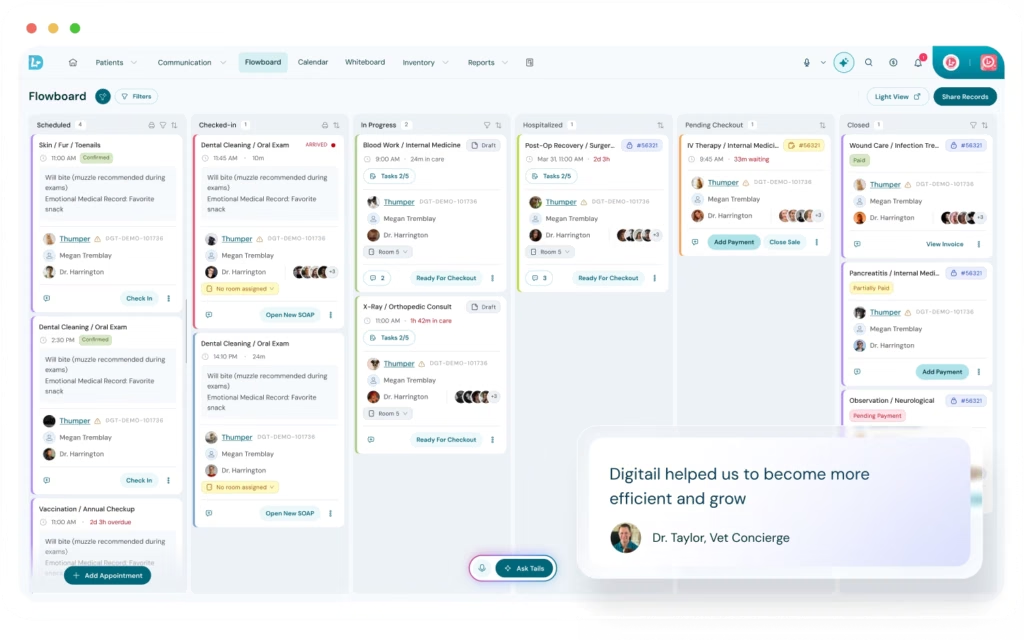
In Digitail, the Flowboard tracks patients from Scheduled and Checked In through In Progress, Hospitalized, Pending Checkout, and Closed. The Whiteboard automatically displays patients whose records are In Progress or Hospitalized, along with their associated care tasks.
This connection allows clinical teams to focus on active patient care while the front desk manages arrivals, waiting patients, and checkout.
The fewer ambiguous handoffs between departments, the more reliable your patient flow information becomes.
2. Prioritize Treatment Tasks on Your Veterinary Digital Whiteboard
A busy treatment board may contain dozens of tasks, but not every task requires immediate attention.
Rather than reviewing every patient and task individually, start by identifying overdue treatments, time-sensitive medications, and patients requiring closer monitoring.
A useful approach is to organize work around three questions:
- Which tasks are overdue or approaching their deadlines?
- Which patients require immediate attention?
- Which tasks are waiting on something outside the team’s control?
Digitail’s Whiteboard allows teams to filter tasks by status, including Not Started, In Progress, Waiting, and Done, as well as by due or overdue deadlines. Teams can also prioritize hospitalized patients or narrow the view by visit type.
For example, during morning rounds, your team might filter for hospitalized patients and overdue tasks first, then review upcoming treatments.
3. Improve Team Coordination with Clear Task Assignments
Assigning every task to a specific person may seem organized, but it can create unnecessary bottlenecks.
If one technician has several assigned tasks while another has availability, work may sit in the queue simply because of how responsibilities were distributed.
Instead, decide which tasks require individual ownership and which can be handled by the next available qualified team member.
For example, a veterinarian’s review of diagnostic findings may require a specific assignment, while certain routine care tasks can remain available to the nursing team.
In Digitail, tasks can be assigned to individual staff members, teams, or left unassigned. Team members can claim available work, making it easier to redistribute responsibilities as workloads change.
Keep ownership explicit for tasks that require clinical decisions, follow-up accountability, or continuity of care. For routine shared tasks, allow qualified team members to take ownership as capacity becomes available. This gives your team flexibility without sacrificing accountability.
4. Automate Recurring Veterinary Treatment Tasks
Many veterinary workflows involve predictable sequences of tasks.
A surgical patient may need preoperative preparation, scheduled monitoring, postoperative assessments, and discharge instructions. A hospitalized patient may need recurring treatments and observations throughout the day.
Creating each task manually takes time and increases the chance that something gets overlooked.
With Digitail’s Task Templates, clinics can automatically generate tasks based on specific visit types, services, diagnoses, products, or completed laboratory results.
For example, a surgical admission can trigger a predefined set of preparation and monitoring tasks. When a laboratory result is completed, a separate task can be generated to review the findings and contact the client.
These tasks can then be managed through the Whiteboard alongside other active patient care responsibilities.
Start with one high-volume workflow, such as routine surgery or hospitalization. Document the steps your team consistently performs, determine which require assigned ownership, and build a reusable task template.
Review the template periodically to ensure it still reflects your clinical protocols.
The goal is to automate task creation, not clinical judgment.
5. Streamline Shift Handoffs with a Digital Whiteboard
Shift changes are particularly vulnerable to communication gaps.
The outgoing team knows which treatments were completed, which patients need monitoring, and which results are pending. The incoming team needs to understand those details without reconstructing the entire shift.
A digital whiteboard can make handoffs more structured, provided everyone keeps it current.
Rather than relying entirely on verbal updates, walk through the active patient list together.
Focus on outstanding treatments, overdue tasks, pending results, changes in patient condition, and responsibilities that need to transfer to the next shift.
In Digitail, staff can review active patients and their tasks from the Whiteboard, then access the associated SOAP record when additional clinical context is needed.
Make updating task statuses part of the handoff process. Before transferring responsibility, confirm that completed treatments are documented and that unfinished tasks have clear ownership.
For patients with complex care needs, use the Whiteboard to guide the discussion rather than replace a clinical handoff.
6. Identify Bottlenecks with Veterinary Patient Flow Data
Even when tasks are completed on time, patients may still experience long waits or unnecessary delays between stages of their visit.
These problems aren’t always obvious during a busy day.
Reviewing patient flow data can help determine whether delays are concentrated around check-in, examinations, hospitalization, or checkout.
For example, if patients consistently spend more time waiting for checkout than expected, the problem may involve discharge documentation, invoice preparation, or coordination between the clinical and reception teams.
Digitail’s Flowboard Report provides retrospective data on patient waiting times, hospitalization duration, and total visit times, with breakdowns by visit type.
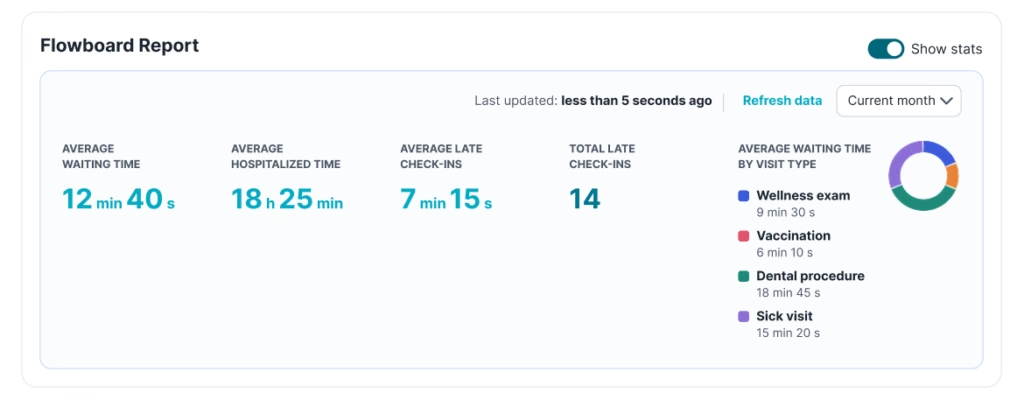
Rather than making broad changes to clinic operations, use this information to identify one recurring bottleneck and test a targeted improvement.
Keep in mind that reliable reporting depends on staff consistently updating patient statuses.
Make Your Veterinary Whiteboard Part of the Workflow
A digital whiteboard is most valuable when it becomes part of how your team manages patient care, rather than another screen that needs updating.
Accurate patient statuses, clear task ownership, automated workflows, and structured handoffs help everyone work from the same information.
Digitail connects its Flowboard, Whiteboard, patient records, and task management tools so veterinary teams can coordinate care without constantly switching between disconnected systems.
By making a few practical improvements to how these tools are used, practices can reduce unnecessary coordination work and create a more predictable patient flow.
See How Digitail Supports Your Clinical Workflow
Manage patient visits, coordinate treatment tasks, and keep your veterinary team connected throughout the day.