Learn the simple formula that transforms generic AI responses into precise, usable veterinary content.
Artificial intelligence can dramatically reduce documentation time, but only if you know how to prompt it effectively.
Here is the good news: Digitail’s artificial intelligence (Tails AI) already has your patient’s complete medical history, visit records, and owner information. You do not need to provide this context. However, you do need to tell it specifically how to use that information.
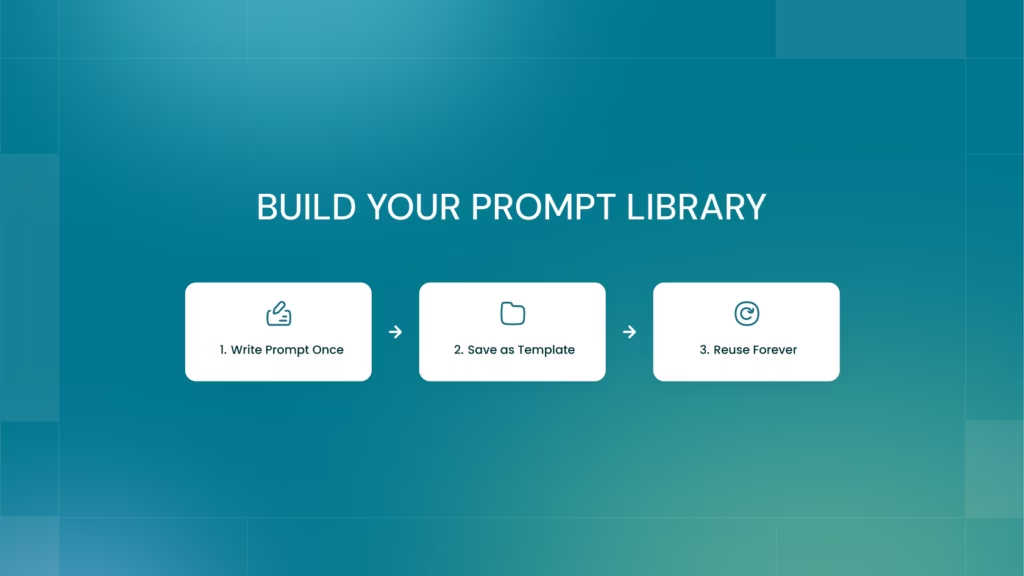
The best part? Create a good prompt once, save it as a template, and reuse it forever. No rewriting required, just consistent high-quality results every time.
In this article:
Why Prompting Structure Matters
AI output quality depends entirely on how you structure your request. A vague prompt gets you generic results. A specific, well-structured prompt gets you exactly what you need.
The difference between “write a follow-up email” and a properly structured prompt can mean the difference between spending 10 minutes editing versus using the output immediately.
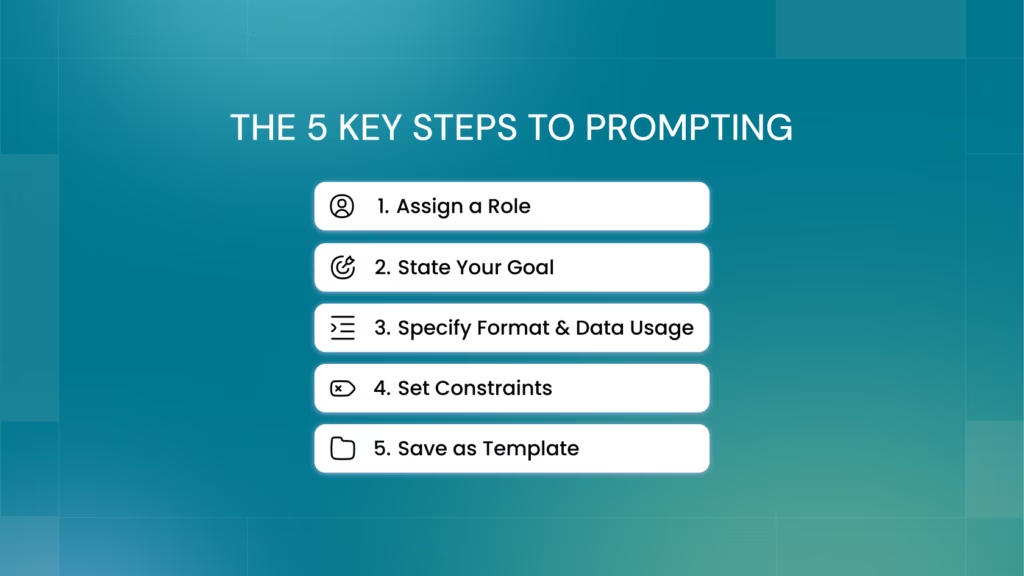
The 5-Part Prompting Recipe
Use this framework across all Digitail AI functionality for best results:
1. Assign a Role
Give Tails AI a clear perspective. “You are a veterinary medical assistant” or “Act as a clinical technician preparing discharge instructions.”
2. State the Goal
Define what you are creating and why. “Draft a follow-up email to address lab results” or “Generate a pre-appointment allergy summary.”
3. Specify the Format and Data Usage
This is where you direct Tails AI to use the context it already has and how to structure the output:
Format:
“Start with a 2 to 3 sentence summary, then detailed sections”
“Use bold headers for ‘Notable Results’ and ‘Next Steps’ “
“Structure as a table with columns: Product Name, Category, Issue”
Data usage:
“Address the pet parent by their name”
“Compare these results to previous lab work in the patient history”
“Reference the specific follow-up tasks from the last SOAP note”
4. Set Constraints
Define what to avoid or emphasize, some examples include:
“Write ‘Not Available’ if information is missing, never guess”
“No medical jargon without explanation”
“Professional but reassuring tone”
5. Save as a Template
Once you create and refine a prompt that works the way you like, save it to your template library. You only build it once, then reuse it indefinitely for consistent results.
Prompting in Digitail: Practical Examples
Below are prompt examples you can use within the different areas of Digitail, at the end, you’ll get access to a library with over 100 prompts that you can sue as templates.
QuickSOAP: Divide Work Between Veterinarians and Technicians
Tails AI can generate different SOAP sections based on who is documenting, allowing technicians and veterinarians to work in parallel.
Prompt for Veterinary Technicians:
Analyze the transcript from a technician’s perspective during a doctor-supervised examination. The SOAP should populate only the Subjective section using bullet-point format for patient history and owner concerns. Leave all other sections (Objective, Assessment, Plan, Summary) completely blank. Record vital signs in the vitals widget.
Prompt for Veterinarians:
Analyze the transcript from a veterinarian’s examination. The SOAP should populate only the Objective (examination findings), Assessment (diagnosis and differential diagnoses), Plan (treatment plan), and General Recommendations sections. Do not add to the Subjective section as patient history was gathered separately.
Why this works: Each role gets exactly the sections they need to complete without overwriting the other’s work.
Tip
Save these prompts to your template library and your team will get consistent section divisions every time.
Client Communication: Lab Results Follow-Up
Writing follow-up emails that are clear, complete, and professional becomes faster when you direct Tails AI to pull specific information from the patient record.
Example Prompt:
You are a veterinary medical assistant. Reference the patient medical data in the EMR knowledge base. Never invent.Draft a professional and empathetic follow-up email about the most recent lab report and clinical notes from the last visit in the EMR. Address the pet parent by their name. Follow this structure strictly:
Opening: ‘Hi [Pet Parent Name],’
Introduction: “This is [Dr. Name] from [Clinic Name] following up on the lab results for [Pet Name]from our visit on [Date of Last Visit].”
High-Level Summary: Provide a 2-3 sentence non-technical summary of the overall findings (e.g., “The results show that [Pet Name] is generally healthy, though we found a few markers that explain the symptoms we discussed during the exam.”)
Section: Notable Results
Bold header section ‘Notable Results’ with bulleted list of any abnormalities
Compare these results to previous lab work found in the patient history and note if values are improving, stable, or declining
Mention important “normal” results if they help rule out conditions discussed during the last visit
Section: Next Steps
Bold header ‘Next Steps’ with bulleted list outlining the specific plan.
Reference any specific follow-up tasks mentioned in the “Plan” section of the last SOAP note
Closing: Invite them to email or message through the app with questions (e.g. “Please feel free to email us at [Clinic Email] or message us through the app with any questions or concerns you may have.”)
Sign-off: Use the doctor’s name and clinic. (e.g. “Best regards, [Dr. Name].”)
Constraint: Do not use medical jargon without explaining it in simple terms. Avoid bolding anything except the two headers mentioned above.
Why this works: The artificial intelligence knows which pet parent, which visit, and which lab results. Your prompt tells it exactly how to structure that information and what tone to use.
Tip
Save this prompt to your template library and every lab follow-up will have the same professional structure and clear communication style in seconds.
Discharge Notes: Post-Operative Care Instructions
Clear discharge instructions prevent post-operative complications and reduce follow-up calls from confused pet owners.
Example Prompt:
You are a veterinary clinical assistant. Generate clear, professional, and actionable post-operative discharge instructions for [Pet Name] who underwent a spay (ovariohysterectomy).Reference the patient medical data in the EMR knowledge base.Never invent.
Goal: Provide the pet owner with home care instructions that minimize the risk of post-operative complications.
Format:
Use bold headings and bullet points for scannability.
Professional yet reassuring tone.
Do not use conversational filler (e.g., “Here is the document” or “I hope this helps”). Start directly with instructions.
Content to include:
1. Post-Anesthesia Care:
Reference the patient’s normal feeding schedule. Offer one-quarter of normal dinner tonight, then the rest after one hour if no vomiting.
Explain that grogginess is normal for 24 hours and doesn’t always indicate pain.
2. Activity Restrictions (Strict):
The E-collar must stay on at all times for 10 to 14 days.
Strict rest for 10 to 14 days (no jumping, running, or stairs).
Walks to be short, on-leash bathroom breaks only.
3. Incision Care:
Monitoring: Daily checks for cleanliness and dryness.
Sutures: Clarify that sutures are internal and dissolvable unless the record states otherwise.
Hygiene: No bathing or swimming for 14 days.
4. Red Flags (When to Call):
List signs such as vomiting, extreme lethargy, foul odor or discharge from the incision, or the incision appearing open.
5.Follow-Up: Recommend a recheck in 10 to 14 days.
Why this works: You get comprehensive, professionally structured instructions that cover all critical post-operative care without missing details.
Tip
Create similar prompt templates for other common procedures (neuter, dental, mass removal) and never write from scratch again.
Tails Assistant: Complex Medical History Summaries
When a patient has extensive history, asking for a specific summary saves time reviewing records before appointments.
Example Prompt:
You are a veterinary clinical assistant preparing a pre-appointment summary for a patient with documented or suspected allergies.Reference the patient medical data in the EMR knowledge base.
Generate a concise allergy history summary covering:
Known Allergies and Sensitivities: List all documented allergies (medications, foods, environmental, vaccines, topicals) with dates of identification
Clinical Signs and Reactions: Describe documented symptoms for each allergy
Diagnostic Workup: Allergy testing, elimination diet trials, or bloodwork performed
Treatment History: Previous interventions and their effectiveness
Current Allergy Medications: Active prescriptions with drug names, dosages, frequency, and duration
Diet Considerations: Prescription or limited-ingredient diets past or current
Key Notes for Clinician: Seasonal patterns, owner observations, or pending follow-up
Critical Rules:
Only use information explicitly found in the patient record
Never invent, assume, or extrapolate data
Output ‘Not Available’ for any missing information
Flag any data inconsistencies in a dedicated {⚠️Data Inconsistencies’ section at the end}
Why this works: You get a focused summary that pulls relevant information from potentially years of records, organized exactly how you need it for clinical decision-making.
Tip
Create similar templates for chronic disease summaries, medication histories, or surgical histories.
Tails Vision: Extracting History from Uploaded Documents
When a new patient transfers with records from another clinic, you need to extract their complete history quickly.
Example Prompt:
Extract entire medical history with concise details of each visit and client communication in chronological order.
Summarize per visit first (2 to 4 bullets each), then produce a final 6 to 10 bullet consolidated summary compiled only from those visit summaries.
Output format:
Visit Log table with columns: Date, Visit Type, Findings, Diagnosis, Treatment, Client Communication, Evidence (exact quote from document).
Consolidated Summary section with 6 to 10 bullets.
Anti-Hallucination Rules:
If a value is not explicitly stated in the document, write UNKNOWN.
Never guess, infer, or calculate unstated values.
For each finding and diagnosis, include the shortest exact quote as evidence.
If conflicting values exist, quote all and flag with “CONFLICT”.
Why this works: You get structured extraction of historical data with evidence trails, preventing artificial intelligence from inventing information.
Tip
Save this prompt template so transfer patients get consistent, thorough record reviews.
Tails Practice Manager: Inventory and Pricing Audits
Finding operational issues in your practice management data becomes faster with specific queries.
Example Prompt:
List 30 products missing an AAHA code or a markup (where markup is 0 or Price = Cost). Format as a table with columns: Product Name, Category, Specific Issue, and Cost versus Sale Price.
Why this works: You get actionable data in a scannable format that makes it easy to fix pricing issues.
Tip
Run this prompt monthly in batches to catch inventory setup problems before they affect revenue.
Build Your Prompt Library
Good prompts take a bit of time to craft. But you only build them once.
Every AI-powered module in Digitail lets you save custom prompts as templates. When you create a prompt that works well for your task:
Select and Copy your prompt.
Click “Manage Templates”.
Pasteyour prompt, and click “Add”.
Reuse it whenever you need that output.
This turns 10 minutes of careful prompting into 10 seconds of selecting from your library. Your entire team gets consistent, high-quality outputs without reinventing the wheel every time.
Tip
Start with the examples in this article. Customize them for your clinic’s specific workflows and communication style, then save them.
Common Prompting Mistakes to Avoid
❌ Being Too Vague: “Write a SOAP note” does not tell the AI which sections to complete or what perspective to use. It leaves it open to interpretation and for AI to make the decision.
❌ Forgetting that Tails AI has Context: You do not need to say “The patient is a 5-year-old Labrador.” Tails AI already knows. Instead, say “Reference the patient’s age and breed when explaining treatment options.”
❌ Not Specifying Format: If you want bullet points, numbered lists, or specific headers, ask for them explicitly.
❌ Ignoring Tone: “Professional but reassuring” gives very different output than “Clinical and concise.”
❌ Not Saving What Works: If you get a good result, save that prompt immediately. You will want to use it again.
Getting Started
To avoid starting from scratch when you create your first template:
List your top 5 most common or time-consuming tasks (discharge instructions, lab follow-ups, SOAP notes, client communications, etc.)
Find an example you love. Pull up a discharge instruction, email, or SOAP note you wrote that came out exactly how you wanted.
Ask Tails AI to reverse-engineer it. Use the prompt below:
“Analyze the [discharge instruction/email/SOAP note] provided below and create a prompt template that would generate outputs in this exact style and structure. Include specific formatting requirements, tone guidelines, and data points to reference.”
Refine the template using the 5-part recipe from this guide (role, goal, format, constraints, save as template).
Test and adjust. Run it on a real case, tweak what doesn’t work, then save the final version.
Create one template. Use it. Refine it. Save it. Then move to the next one.
Within a few weeks, you will have a library of templates that covers your most common documentation needs and helps you use Tails AI effectively.
Note
We created a prompt library with over 100 of the most commonly used prompts in Digitail. Click the button below to gain access.
Use Artificial Intelligence Technology to Advance the Way You Practice and Deliver Care
Tails AI is your ultimate veterinary assistant built directly into your practice management software. Hefner Road Animal Hospital uses Digitail and Tails AI to save 70+ minutes per doctor, every day. Doctors now leave on time with zero chart backlog. Read the success story.
If you still think AI in veterinary software is mainly about dictating SOAP notes, you’re seeing only a small fraction of what’s happening in modern veterinary practices. While automated transcription is a great first step, limiting AI to a single task is like using a cutting-edge ultrasound machine as a paperweight. Over the past few...
Choosing a Practice Information Management System (PIMS) used to be about digitizing records. In 2026, with new demands for AI, seamless client communication, and workflow automation, choosing a PIMS is no longer about selecting veterinary software—it’s about partnering with a platform that will evolve with your practice. Use these key questions to evaluate potential PIMS...
The Cross-Industry Pattern Veterinary Medicine Can’t Afford to Ignore In recent years, companies across industries have added an entirely new leadership role to manage AI adoption. According to a 2025 IBM survey of over 2,300 organizations, one in four companies now have a Chief AI Officer, tasked with managing everything from tool selection to ethical...